

Onboarding Trusts
This guide is for fully disclosed partners using DriveWealth’s Trust Account product to onboard and support trust entities. If your platform only supports individual accounts or you manage customer data independently, you can skip this section.
A trust account is a brokerage account registered under a legal trust to manage assets for the benefit of specific individuals or entities. Trust accounts differ from individual accounts in their legal ownership and the documentation required for compliance and regulatory purposes, including the Trust Deed, the identification of grantors, trustees and beneficiaries, and specific details regarding the trust’s identifications.
Integration path
Your integration path is determined mainly by 2 factors:
KYB (Know-Your-Business) methods supported:
- DriveWealth Does KYB (
DO_KYB): DriveWealth performs KYB checks on new accounts (up to 1 week processing time). For KYB approval, DriveWealth requires successful completion of KYC for all individuals associated with of the trust, as well as verification of the trust itself. - DriveWealth Relies on Partner (
NO_KYB): DriveWealth relies on the partner’s KYB process, subject to KYB policy and procedure review.
The appropriate KYB method depends on your location, licenses, and AML capabilities. Contact your DriveWealth Relationship Manager to discuss the right approach.
Customer base
- US Entities Only: DriveWealth auto-generates W9 forms using information of the trust.
- Foreign Entities: Must provide a valid W8 form via a 3rd party vendor ComplyExchange. You must embed a ComplyExchange white-labeled UI widget for the trust to complete the form.
Note that trusts can only begin investing when both KYB verification and W8/W9 validation are complete.
Key concepts
| Component | Description |
|---|---|
| Entities API | Create the legal trust entity |
| Users API | Create individuals linked to the trust (grantors, trustees, beneficiaries) |
| Documents API | Upload legal documents (trust deed, address proof, etc.) |
| Accounts API | Create the trust account |
| Event notification | Receive notifications via entities.created and entities.updated events |
Onboarding
Step 1. Create a Trust Entity
Collect information of the trust for onboarding and verification. Field requirements vary by incorporation country.
| Category | Required | Required Fields |
|---|---|---|
| Entity Type | ✅ | Type should be TRUST to indicate trust entity |
| Attributes | ✅ | Name, Incorporation Country, Incorporation Province (US only), Incorporation Date |
| Identifications | ✅ | EIN or SSN (US), FTIN (Foreign), GIIN (if applicable) |
| Contact | ✅ | Address (valid physical address in incorporation country), Phone (E164 format), Email, Phone number |
| Disclosures | ✅ | Customer Agreement, Terms of Use, Privacy Policy, Rule 14b FPSL, Margin Agreement, and other agreements if applicable |
| Investment Profile | ❌ | Optional: Revenue, Net Worth, Investment Objectives, Risk Tolerance, Liquidity Needs, Experience, Time Horizon, Transaction Volume |
| Financial Affiliations | ❌ | Affiliations with financial institutions or regulated entities, if applicable |
| Metadata | ❌ | Optional custom fields |
Create entity sample payload:
POST /entities

{
   "type": "TRUST",
   "attributes": {
       "name": "Testing Trust",
       "incorporationCountry": "USA",
       "incorporationProvince": "CA",
       "incorporationDate": "2019-01-01"
   },
   "identifications": {
       "ein": "878605255"
   },
   "contact": {
       "addresses": {
           "primary": {
               "street1": "123 Main Street",
               "city": "San Francisco",
               "province": "CA",
               "zipcode": "94105",
               "country": "USA"
           }
       },
       "phone": "+15106001234",
       "email": "[email protected]"
   },
   "disclosures": {
       "termsOfUse": {
           "agreed": true,
           "signedBy": "name",
           "signedWhen": "2024-09-09T15:20:05.228124050Z"
       },
       "customerAgreement": {
           "agreed": true,
           "signedBy": "name",
           "signedWhen": "2024-09-09T15:20:05.228124050Z"
       },
       "privacyPolicy": {
           "agreed": true,
           "signedBy": "name",
           "signedWhen": "2024-09-09T15:20:05.228124050Z"
       },
       "rule14b": {
           "agreed": true,
           "signedBy": "name",
           "signedWhen": "2024-09-09T15:20:05.228124050Z"
       }
   },
   "investorProfile": {
       "annualRevenue": 100000000,
       "netWorthTotal": 10000000000,
       "investmentObjectives": "GROWTH",
       "riskTolerance": "MODERATE",
       "liquidityNeeds": "SHORT_TERM",
       "investmentExperience": "YRS_3_5",
       "timeHorizon": "MODERATE_TERM"
   },
   "metadata": {
       "myCustomKey": "testingusa"
   }
}
If you subscribe to the entities.created event, you should receive a notification when the entity is successfully created. Please refer to Entity events for payload details.
Step 2. Upload Trust Documents
DriveWealth requires documentation to verify the legal existence of the Trust and the authority of the individuals acting on its behalf. The Trust must provide a Certification of Trust (or a "short form" Trust Deed/Memorandum of Trust) that includes the legal name of the trust, the date of the trust agreement, the state or jurisdiction of law, and the names of all currently acting Trustees. This document must explicitly confirm the Trustees' power to open a brokerage account and transact in securities.
Best practices:
- Ensure trust names provided in account application match with legal documentation
- Use high-quality document scans—blurry or incomplete uploads can delay KYB processing.
- Only upload a short form of the trust deed, do not include the entire trust agreement
Upload document sample payload:
POST /documents

{
  "userID": "{{entityID}}",
  "type": "TRUST_DOCUMENTS",
  "document": "data:image/png;base64,iVBORw0KGgoAAAANSUh..."
}
Step 3. Create Grantors, Beneficiaries, & Trustees
The trust must provide information on the following individuals for regulatory and compliance purposes:
- Grantor: The individual who creates and funds the trust. Grantors must be 18 years of age or older.
- Beneficiary: The individual(s) who benefit from the managed assets and will ultimately receive the proceeds of the account in accordance with the trust's instructions. Minor beneficiaries under 18 are permitted.
- Trustee: The individual or institution (e.g., a financial professional or the brokerage firm) legally responsible for managing the assets in the account, including making investment decisions and trades, in accordance with the terms of the formal trust agreement. The trustee acts as a fiduciary, meaning they must act in the best financial interest of the beneficiaries. Individual trustees must be at least 18 years old.
Create Grantor, Beneficiary and Trustee as individuals using the Users API, and link to the Entity using the DIRECTOR_INFO section. Required information includes:
- Standard KYC information: name, DOB, citizenship, tax ID number, address, and photo ID (if required)
- Role: grantor, beneficiary, trustee, or a combination of them
Create user sample payload:
POST /users

{
   "userType": "INDIVIDUAL_TRADER",
   "documents": [
       {
           "type": "BASIC_INFO",
           "data": {
               "firstName": "Jane",
               "lastName": "Doe",
               "country": "USA",
               "phone": "2912341122",
               "emailAddress": "[email protected]"
           }
       },
       {
           "type": "IDENTIFICATION_INFO",
           "data": {
               "value": "690055315",
               "type": "SSN",
               "citizenship": "USA"
           }
       },
       {
           "type": "PERSONAL_INFO",
           "data": {
               "birthDay": 3,
               "birthMonth": 12,
               "birthYear": 1990            }
       },
       {
           "type": "ADDRESS_INFO",
           "data": {
               "street1": "123 Main St",
               "city": "Chatham",
               "province": "NJ",
               "postalCode": "09812"
           }
       },
       {
           "type": "EMPLOYMENT_INFO",
           "data": {
               "status": "Employed",
               "broker": false,
               "company": "MyCo",
               "type": "PROFESSIONAL",
               "city": "Gotham",
               "country": "USA"            }
       },
       {
           "type": "DIRECTOR_INFO",
           "data": {
               "directorList": [
                   {
                       "title": "N/A",
                       "roles": [
                           "BENEFICIARY",
                           "TRUSTEE",
                           "GRANTOR"
                       ],
                       "controlContact": true,
                       "institutionalID": "{{entityid}}"
                   }
               ]
           }
       }
   ]
}
Step 4. Create Trust Account
Create the trust account under the trust entity using one of the 3 supported account management types:
TRUST_SELF | Trust makes investment on its own |
TRUST_RIA_MANAGED | A Registered Investment Advisor fully manages investment |
TRUST_ADVISORY | Trust makes investment with guidance from a Registered Investment Advisor |
Create account sample payload:
POST /accounts

{
   "userID": "{{entityid}}",
   "accountType": "LIVE",
   "accountManagementType": "TRUST_SELF",
   "tradingType": "CASH"
}
Step 5. Complete W-8 Form
Applicable to non-US trusts only. A W9 is auto-generated by DriveWealth for US trusts.
Non-US trusts are required to complete the appropriate W-8 form through a third-party platform, ComplyExchange. DriveWealth generates a unique ComplyExchange URL for each entity with certain identification details prefilled. Partner may either share this URL directly with the client or embed ComplyExchange’s UI within their application. An authorized signer of the trust must complete the remaining sections of the form, including critical tax-related information such as Chapter 3 and Chapter 4 status codes.
ComplyExchange offers step-by-step guidance and helpful tools to assist the client in accurately completing the form. Below is a sample of the ComplyExchange UI. The interface can be customized to align with your branding.
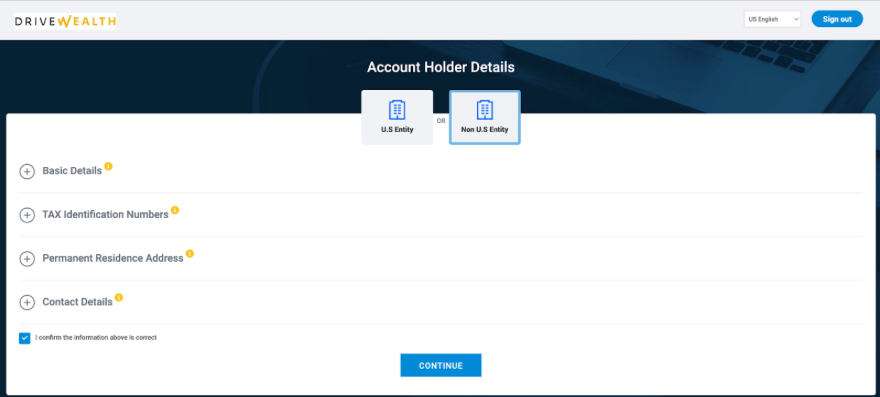
DriveWealth generates a ComplyExchange URL only after having received an account creation request. You can use the Retrieve Entity API to view the Entity’s ComplyExchange URL. Additionally, you will also receive an entities.updated notification if you subscribe to the event.
Example API response snippet:
"taxData": {
  "fatcaData": {
    "applicable": true,
    "applicableFrom": "2025-08-26T19:49:58Z",
    "setBy": "SYSTEM"
  },
  "vendor": {
    "COMPLY_EXCHANGE": {
      "name": "Comply Exchange",
      "taxFormUrl": "https://drivewealth.complytaxforms.com/ServiceRedirect.aspx?UUID=xxx&Language=US",
      "formUrlDate": "2025-08-26T19:50:20Z"
    }
  }
}
Updated 6 days ago