

Self-Managed Super Fund (SMSF) Account Onboarding Guide
Overview
A Self-Managed Super Fund (SMSF) account is a private, member-managed retirement fund holding 2–6 individual trustees who are responsible for compliance and SMSF management. SMSF is a type of Trust account and differs from individual accounts in its legal ownership and the documentation required for compliance and regulatory purposes, including the Trust Deed, the identification of trustees, and specific details regarding the trust's identifications.
Key concepts
| Component | Description |
|---|---|
| Entities API | Represents the legal SMSF entity |
| Users API | Creates trustees linked to the SMSF |
| Documents API | Uploads trust deed and other supporting documents |
| Accounts API | Creates SMSF accounts owned by the SMSF entity |
| Entities event notification | Receive notifications on entities.created and entities.updated events |
Onboarding
Step 1. Create SMSF
Collect entity data for onboarding and verification.
| Category | Required | Details |
|---|---|---|
| Entity Type and subType | ✅ | SMSF identified as entity with type=TRUST and subType=SMSF |
| Attributes | ✅ | Name, Incorporation Country, Incorporation Date |
| Identifications | ✅ | SMSF must provide an Australian Business Number (ABN) |
| Contact | ✅ | Address (valid physical address in incorporation country), Phone (E.164 format), Email |
| Disclosures | ✅ | Customer Agreement, Terms of Use, Privacy Policy, Rule 14b, and other agreements if applicable |
| Investment Profile | ❌ | Optional: Revenue, Net Worth, Investment Objectives, Risk Tolerance, Liquidity Needs, Experience, Time Horizon, transaction volume by asset class |
| Financial Affiliations | ❌ | Affiliations with financial institutions or regulated entities, if applicable |
| Metadata | ❌ | Optional custom fields |
Create SMSF — sample payload:
curl --request POST \
     --url https://bo-api.drivewealth.io/back-office/entities \
     --header 'accept: application/json' \
     --header 'content-type: application/json' \
     --header 'dw-client-app-key: {{yourAppKey}}' \
     --data '{
       "type": "TRUST",
       "subType": "SMSF",
       "attributes": {
         "name": "SMSF Testing",
         "incorporationCountry": "AUS",
         "incorporationDate": "2020-01-01"
       },
       "identifications": {
         "abn": "51824753556"
       },
       "contact": {
         "addresses": {
           "primary": {
             "street1": "12 Shelley Street",
             "city": "Sydney",
             "province": "NSW",
             "zipcode": "2000",
             "country": "AUS"
           }
         },
         "phone": "+61412345678",
         "email": "[email protected]"
       },
       "disclosures": {
         "termsOfUse": {
           "agreed": true,
           "signedBy": "name",
           "signedWhen": "2024-09-09T15:20:05.228124050Z"
         },
         "customerAgreement": {
           "agreed": true,
           "signedBy": "name",
           "signedWhen": "2024-09-09T15:20:05.228124050Z"
         },
         "privacyPolicy": {
           "agreed": true,
           "signedBy": "name",
           "signedWhen": "2024-09-09T15:20:05.228124050Z"
         },
         "rule14b": {
           "agreed": true,
           "signedBy": "name",
           "signedWhen": "2024-09-09T15:20:05.228124050Z"
         }
       }
     }'
If you subscribe to entities.create event, you should receive entities.created notification when the entity is successfully created. Please refer to entity events for payload details.
Step 2. Upload Trust Deed
DriveWealth requires documentation to verify the legal existence of the SMSF and the authority of the individuals acting on its behalf. The SMSF must provide a Trust Deed that includes the legal name of the trust, the date of the trust agreement, the state or jurisdiction of law, and the names of all currently acting Trustees. This document must explicitly confirm the Trustees' power to open a brokerage account and transact in securities.
Best practice
- Ensure SMSF names provided in the account application match legal documentation.
- Use high-quality document scans — blurry or incomplete uploads can delay KYB processing.
- Only upload a short form of the trust deed; do not include the entire trust agreement.
curl --request POST \
     --url https://bo-api.drivewealth.io/back-office/documents \
     --header 'accept: application/json' \
     --header 'content-type: application/json' \
     --header 'dw-client-app-key: {{yourAppKey}}' \
     --data '{
       "userID": "{{entityID}}",
       "type": "TRUST_DOCUMENTS",
       "document": "data:image/png;base64,iVBORw0KGgoAAAANSUh..."
     }'
Step 3. Add Trustees
Trustees are individuals or corporate entities (such as financial institutions) that hold legal responsibility for asset management, investment strategies, and trade execution under the governing Trust Deed. Operating in a fiduciary capacity, trustees must ensure all actions prioritize the beneficiaries' best interests. Note that all individual trustees must be at least 18 years of age. The SMSF entity must provide 2-6 Trustees for regulatory and compliance purposes.
At this time, DriveWealth supports individual trustees; corporate or entity trustees are not yet supported. You can create individual trustees via the Users API, ensuring they are linked to the SMSF entity through the DIRECTOR_INFO section. Mandatory data points include full name, date of birth, citizenship, identification number, residential address, and high-quality Photo ID (if required for verification).
curl --request POST \
     --url https://bo-api.drivewealth.io/back-office/users \
     --header 'accept: application/json' \
     --header 'content-type: application/json' \
     --header 'dw-client-app-key: {{yourAppKey}}' \
     --data '{
       "username": "test.{{$timestamp}}",
       "password": "passw0rd",
       "userType": "INDIVIDUAL_TRADER",
       "documents": [
         {
           "type": "BASIC_INFO",
           "data": {
             "firstName": "trustee",
             "lastName": "smsf",
             "country": "AUS",
             "phone": "2912341122",
             "emailAddress": "[email protected]",
             "language": "en_US"
           }
         },
         {
           "type": "IDENTIFICATION_INFO",
           "data": {
             "value": "123456788",
             "type": "FTIN",
             "citizenship": "AUS"
           }
         },
         {
           "type": "PERSONAL_INFO",
           "data": {
             "birthDay": 3,
             "birthMonth": 12,
             "birthYear": 1999
           }
         },
         {
           "type": "ADDRESS_INFO",
           "data": {
             "street1": "123 Main St",
             "city": "Sydney",
             "province": "NSW",
             "postalCode": "2000"
           }
         },
         {
           "type": "DIRECTOR_INFO",
           "data": {
             "directorList": [
               {
                 "roles": ["TRUSTEE"],
                 "controlContact": true,
                 "institutionalID": "{{entityid}}"
               }
             ]
           }
         }
       ]
     }'
Step 4. Open Trust Account
Create an SMSF account owned by the SMSF entity using a designated account management type. API Example:
curl --request POST \
     --url https://bo-api.drivewealth.io/back-office/accounts \
     --header 'accept: application/json' \
     --header 'content-type: application/json' \
     --header 'dw-client-app-key: {{yourAppKey}}' \
     --data '{
       "userID": "{{entityid}}",
       "accountType": "LIVE",
       "accountManagementType": "SMSF",
       "tradingType": "cash"
     }'
Step 5. W-8 Form Completion
Foreign entities are required to complete the appropriate W-8 forms through a third-party platform, ComplyExchange. DriveWealth will generate a unique ComplyExchange URL for each entity with certain identification details prefilled. You may either share this URL directly with the entity customer or embed ComplyExchange’s UI within your application to facilitate form completion. An authorized signer from the entity must complete the remaining sections of the form, including critical tax-related information such as Chapter 3 and Chapter 4 status codes.
ComplyExchange offers step-by-step guidance and helpful tools to assist the entity in accurately completing the form. Below is a sample of the ComplyExchange UI. The interface can be customized to align with your branding.
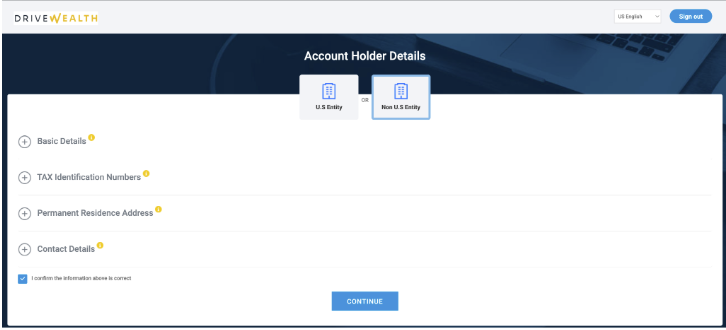
DW will generate a ComplyExchange URL only after receiving account creation requests. You can use the Retrieve ENTITY API to view the entity’s ComplyExchange URL. Alternatively, you will also receive an entities.updated notification if you subscribe to the event.
Example API response snippet:
"taxData": {
  "fatcaData": {
    "applicable": true,
    "applicableFrom": "2025-08-26T19:49:58Z",
    "setBy": "SYSTEM"
  },
  "vendor": {
    "COMPLY_EXCHANGE": {
      "name": "Comply Exchange",
      "taxFormUrl": "https://drivewealth.complytaxforms.com/ServiceRedirect.aspx?UUID=xxx&Language=US",
      "formUrlDate": "2025-08-26T19:50:20Z"
    }
  }
}
Entity verification
Every SMSF is subject to mandatory Know-Your-Business (KYB) screenings and due diligence. DriveWealth supports two KYB modes:
DriveWealth Performs KYB (DO_KYB)
Under the DO_KYB mode, DriveWealth conducts comprehensive KYB screenings for each entity, with an estimated processing turnaround of up to one week. Final approval is contingent upon the successful verification of the entity and completion of KYC requirements for all associated directors. In this mode, DriveWealth assumes responsibility for executing KYB checks once a business account opening request is initiated. During this review period, the SMSF account will maintain a PENDING status until KYB verification is successfully finalized. To monitor progress and identify necessary remediation, refer to the KYB object within the Retrieve Entity API. You may utilize this endpoint to check the current status at any time, or subscribe to the entities.updated event to receive real-time notifications regarding KYB milestones.
Example API response snippet:
"kyb": {
  "status": "KYB_DOC_REQUIRED",
  "statusWhen": "2025-10-06T21:03:29.027Z",
  "reasons": [
    {
      "code": "K003",
      "description": "Abnormal document quality. ID may have obscured data points, obscured security features, a corner removed, punctures, or watermarks obscured by digital text overlay "
    }
  ],
  "notes": [
    "Need more doc"
  ]
}
DriveWealth relies on partners (NO_KYB)
Under NO_KYB mode, you assume responsibility for performing KYB and due diligence prior to onboarding with DriveWealth. In this mode, entities are granted an automatic KYB_APPROVED status at the point of creation.
Selection of the appropriate KYB methodology is contingent upon jurisdictional requirements, regulatory licensing, and AML infrastructure. Contact your DriveWealth Relationship Manager to discuss the right approach.
Updated 6 days ago